
If you want the short answer: the PXN CB1 is the button box we point most sim racers toward, because it comes from a recognized peripheral brand, offers 19 physical controls across nine input types, and supports up to 30 programmable inputs, which covers what most drivers map. For a fully customizable PC panel the SIM-PANEL Gen 2 is the alternative, and if you want the most controls and RGB telemetry lighting, a 34 input carbon faceplate box is the feature heavy pick.
A button box moves ignition, pit limiter, brake bias, traction control, and other functions off the keyboard and onto dedicated switches within reach in the cockpit. The category on Amazon is thin and dominated by a handful of units, so this list is short by design; we would rather recommend four boxes we can describe accurately than pad the list with relabeled copies of the same panel. We explain how we review below, and if you are still building out your rig, our Sim Racing for Beginners guide covers where a button box fits in.


Comparison at a Glance
| Button box | Controls | Build | Platform | Notable | Best for |
|---|---|---|---|---|---|
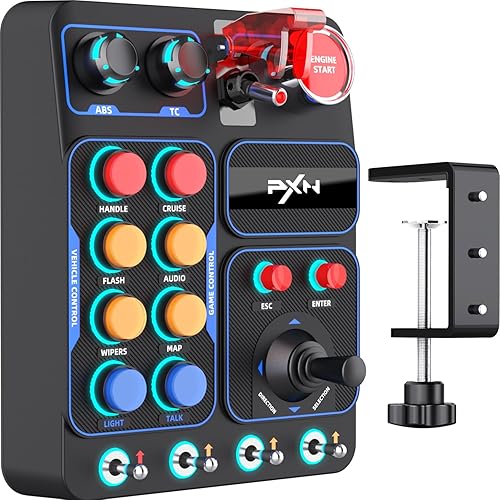
| PXN CB1 | 19 controls, 9 input types, up to 30 programmable | Plastic housing | PC | Recognized peripheral brand | Most sim racers |
| SIM-PANEL Gen 2 | Individually programmable buttons | Horizontal layout panel | PC only | Per button programmable modes | PC users who want to customize deeply |
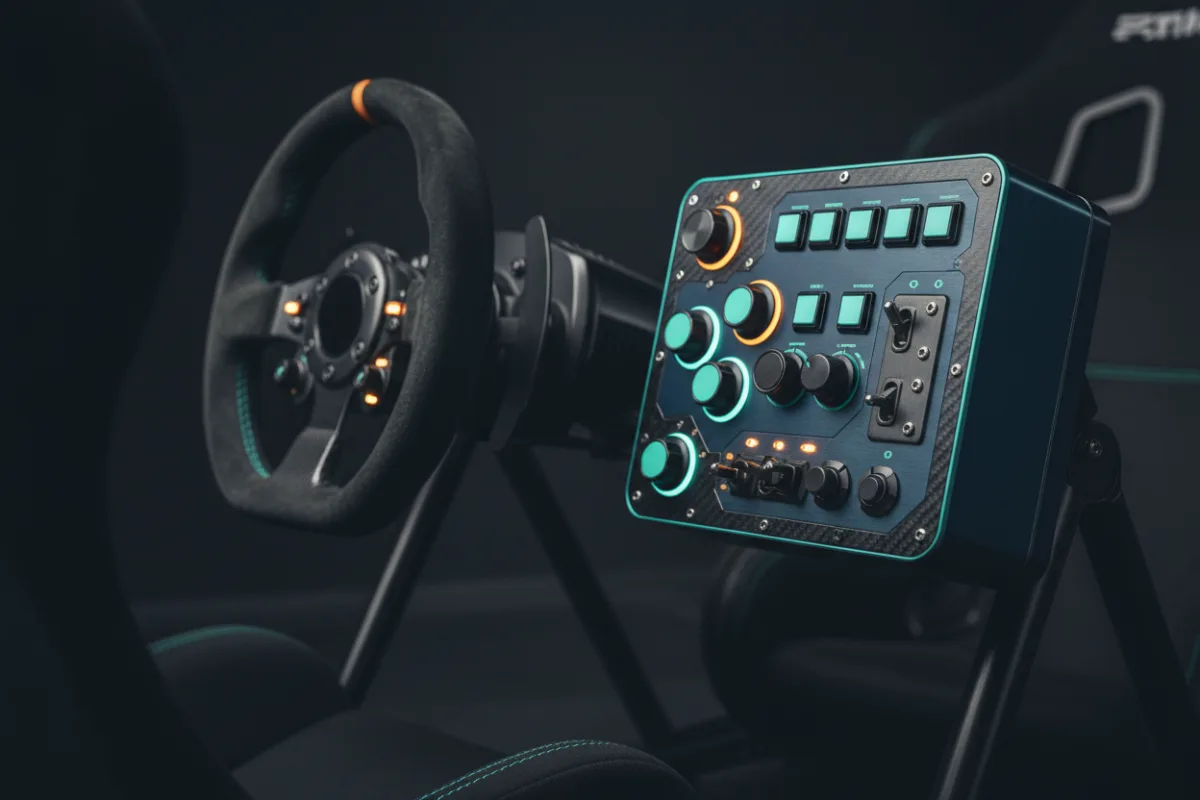
| 34 input carbon faceplate box | 34 configurable inputs | Carbon faceplate, 100 RGB LEDs | PC | Telemetry lighting effects | The most controls and lighting |
| MiYee Button Box | 10 buttons, 3 toggles, 6 rotary encoders, 32 mappable keys | Carbon fiber face, full metal housing | PC, plug and play | Metal build at a lower price | Build quality on a budget |
Control counts and build materials come from each manufacturer’s product listing. Because several Amazon listings resell the same underlying panel under different names, we verified that each box here is a distinct product before including it.
How We Picked
We looked for button boxes that are genuinely distinct from one another, since the category is crowded with the same panel sold under many listings. We weighed the number and type of controls, whether the inputs are freely programmable, build quality, and platform support. We favored boxes that are plug and play on PC and clear about how many inputs they expose, and we set aside listings that could not confirm what was inside the box.
Each product’s WSR Score comes from verified buyer feedback, normalized to our 10-point scale. Read more about how we review.
PXN CB1
The PXN CB1 is a centralized control panel that replaces keyboard commands with dedicated hardware, offering 19 physical controls across nine input types and support for up to 30 programmable inputs for full in game customization. PXN is an established maker of sim racing peripherals, which is worth something in a category full of unbranded panels, and it is designed for multiple simulation genres rather than one title. It is the box we recommend to most drivers because it covers the common functions without overwhelming a new user, and it comes from a seller with a track record.
- Pro: 19 controls across nine input types, with up to 30 programmable inputs
- Pro: from a recognized sim racing peripheral brand rather than an unbranded seller
- Pro: designed to work across racing, truck, and other simulation genres
- Con: plastic housing rather than the metal or carbon of pricier boxes
- Con: fewer total inputs than the 34 input box below
Most sim racers who want a proven, brand backed button box that covers the common functions.
You want a metal build or the maximum number of inputs and lighting.
SIM-PANEL Gen 2
The SIM-PANEL Gen 2 is a PC only box with a horizontal layout and individually programmable buttons, so you can assign multiple functions per control and tailor the panel to any racing discipline. It leans toward users who want to customize deeply rather than plug in a fixed layout, and the horizontal arrangement suits mounting across the front of a cockpit. It is a smaller seller than PXN with less owner feedback, so treat it as the choice for racers who value flexible mapping over a long track record.
- Pro: individually programmable buttons for deep customization
- Pro: horizontal layout suits mounting across the front of a cockpit
- Pro: designed to adapt to different racing disciplines
- Con: PC only, with no console support
- Con: a smaller seller with less owner feedback than PXN
PC racers who want to map functions deeply and prefer a horizontal panel.
You want the reassurance of a large brand and a long owner track record.
34 input carbon faceplate box
This box provides 34 configurable inputs through illuminated buttons, rotary controls, and toggle switches, and it adds 100 RGB LEDs with telemetry style effects. You assign frequently used functions such as ignition, pit controls, brake bias, traction control, ABS, DRS, and lights to the switches for quick access while racing. It is the most feature heavy option here, with the highest input count and lighting, aimed at drivers who map a lot of functions and want the shift and telemetry lights. It is a newer listing, so long term feedback is limited.
- Pro: 34 configurable inputs, the most of any box here
- Pro: 100 RGB LEDs with telemetry style effects
- Pro: mix of illuminated buttons, rotaries, and toggles for varied mapping
- Con: a newer listing with limited owner feedback so far
- Con: more controls than many drivers actually map
Drivers who map many functions and want the maximum inputs plus RGB telemetry lighting.
You only need a handful of switches; the PXN CB1 is simpler and better proven.
MiYee Button Box
The MiYee box stands out for build quality at a lower price: the faceplate is genuine carbon fiber and the housing is a full metal unibody, above the plastic construction of most budget panels. It uses full metal CNC machined buttons with backlight, self locking metal toggles, and rotary encoders, and it is driver free plug and play on PC. It carries fewer inputs than the 34 input box, so it suits racers who want a solid, metal built panel for the core functions rather than the highest control count.
- Pro: carbon fiber faceplate and full metal housing at a budget price
- Pro: metal CNC machined buttons, metal toggles, and rotary encoders
- Pro: driver free plug and play on PC
- Con: fewer total inputs than the 34 input box
- Con: a smaller seller with less owner feedback
Racers who want a metal and carbon build for the core functions without paying premium prices.
You need a high input count; this box focuses on build over control quantity.
Buying Guide
How many controls do you actually need
Count the functions you reach for mid race: ignition, starter, pit limiter, brake bias up and down, traction control, ABS, wipers, lights, and maybe a rotary for the multifunction display. Most drivers land between 15 and 25 mapped inputs, which the PXN CB1 covers comfortably. A 34 input box gives headroom for those who map everything, but do not buy more switches than you will assign, since unused controls add clutter and cost.
Build materials and mounting
Plastic housings keep the price down and are fine for a fixed cockpit, while a metal unibody and carbon faceplate feel more solid and resist flex when you press a stiff toggle. Consider how you will mount the box too: some clamp to a rig or sit on a desk, while others use VESA holes. A box that stays put when you jab a button is worth more than one extra switch.
Platform and software
Nearly every Amazon button box is PC only, registering as a USB game controller that titles read through their own controls menu. Driver free plug and play boxes are the simplest to set up. If you race on a console, confirm support before buying, since most consoles reject generic USB controllers. Mapping is done in each game’s controls screen, one function per input.
Who Should Not Buy
If you race on a PlayStation or Xbox, most of these boxes will not work, so a button box is likely not for you unless you confirm console support first. If your wheel already has enough buttons and rotaries for the functions you use, a separate box adds cost without adding capability. And if you want a premium panel with a long proven track record, the specialist sim hardware brands sold outside Amazon may serve you better than the boxes listed here, which are the strongest options available on this retailer.
Frequently Asked Questions
Do button boxes work on PlayStation or Xbox?
Most do not. A typical USB button box registers as a PC game controller, and consoles restrict which USB devices they accept. If you race on a console, confirm support with the seller before buying, or map functions on your wheel instead.
How do I map a button box in a game?
On PC, plug in the box, open the game’s controls or bindings menu, select the function you want, then press the switch on the box to assign it. Driver free plug and play boxes need no extra software; you map one function per input in each title.
Why are so many button boxes sold under different names?
Several sellers resell the same underlying panel under different brand names, so listings that look distinct can be the same box. We verified that each box in this list is a genuinely different product before including it, which is why the list is short.
Is a metal button box worth the extra cost?
A metal housing and carbon faceplate resist flex and feel more solid under a firm press, which some drivers value. For a fixed cockpit, a well built plastic box like the PXN CB1 works fine, so the upgrade is about feel and durability rather than function.
Can I use a button box with American Truck Simulator?
Generally yes on PC. American Truck Simulator lets you bind extra USB controllers in its controls options, and button boxes are sold specifically for trucking. A box designed for truck and other simulation genres, like the PXN CB1, should map the same way: pick a function, then press the switch. Confirm support with the seller first, and see our truck simulator wheel picks.
Can a Stream Deck replace a button box for sim racing?
Only partly, because the two work differently. A Stream Deck sends keyboard hotkeys to the active window, while a USB button box registers as a game controller with physical switches. A Stream Deck can trigger in game commands if the game accepts those keys and stays in focus. A dedicated box is simpler if you want toggles and rotaries you can find by feel.
Sources
- PXN product listing for the CB1 sim racing button box
- SIM-PANEL and MiYee product listings for their sim racing button boxes
- Manufacturer listing for the 34 input RGB carbon faceplate button box
- September 2026: first published with four distinct sim racing button boxes after filtering out relabeled duplicates.