
A triple monitor mount is judged by two numbers that decide whether your wall stays where you put it: how much weight each arm is rated to carry, and how the mount anchors to your desk or rig. Get those right and three screens sit level and steady through a race. Get them wrong and the wall sags, tips, or shakes with every curb strike. This roundup ranks triple monitor mounts under $200 for a sim racing setup, split between freestanding stands that rest on the desk and clamp mounts that grip its edge, so you can match the mount to your screens and your space. If you run a dedicated cockpit under heavy force feedback, read the note near the end first, because a rig integrated mount may serve you better than any desk stand here.
We compared manufacturer specifications against measurements reported by independent review outlets and recurring owner feedback rather than ranking these from our own bench, and you can read how we review. Two questions decide most triple mount purchases: whether your monitors fall inside the mount’s rated size and weight per arm, and whether a freestanding or clamp design suits your desk. We weight both, alongside the adjustment range and warranty, and if you are still working out how much screen width you need, our field of view (FOV) guide is the better place to start.



How we picked
First, the mount had to match common sim racing screens, so we noted the rated maximum size and the weight limit per arm, since a triple of 27 inch panels can run close to or past some of these ceilings, especially with curved models. From there we split the field by anchoring method, because a freestanding stand and a clamp mount solve different problems: a freestanding base needs no desk edge but wants weight or a bolt to resist a forward pull, while a clamp grips the desk firmly but needs a suitable edge and passes desk vibration into the screens. Adjustment range came next, since tilt, swivel, and height control decide how cleanly you can angle the outer screens toward you. Warranty and recurring owner feedback closed the list, because a mount holds expensive hardware for years and its long term steadiness matters more than its first day.
At a glance
| Model | Type | Screen size range | Load per arm | Warranty |
|---|---|---|---|---|
| VIVO STAND-V003E | Freestanding | 13 to 30 inch | Up to 17.6 lb | 3 year |
| MOUNTUP MU0006 | Clamp or grommet | 10 to 27 inch | Up to about 19.8 lb | See listing |
| VIVO STAND-V300G Pneumatic | Clamp | 17 to 32 inch | Up to 17.6 lb | 3 year |
| HUANUO HNTS3B | Clamp or grommet | 17 to 32 inch | Up to 17.6 lb | See listing |
| WALI GMF003 | Freestanding | 13 to 27 inch | Up to 22 lb | See listing |
| Mount-It MI-2789 | Freestanding | 19 to 27 inch (24 inch curved) | Up to 15.4 lb | Lifetime |
VIVO STAND-V003E: the freestanding value pick
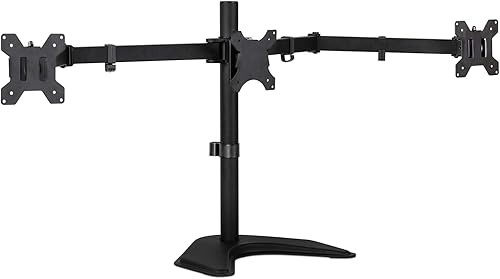
The VIVO STAND-V003E is the freestanding pick for most desks, rated for screens from 13 to 30 inches at up to 17.6 pounds each, with tilt of plus or minus 15 degrees, 180 degree swivel, 360 degree rotation, and a heavy base backed by a 3 year warranty. For a racer who cannot or will not clamp to the desk, this is the sensible choice, because the base carries the wall without needing an edge, and it fits the widest screen size range of the freestanding group. The honest caveat is stability under a forward pull: VIVO states plainly that the stand should be bolted down if you push the monitors far forward, since a freestanding base holds best when the weight stays over its center. For a sim racer that matters, because leaning in to read an apex board is exactly the motion that strains it. It suits a desk of three 27 to 30 inch panels where you can keep them centered or add a bolt.
MOUNTUP MU0006: the clamp value pick
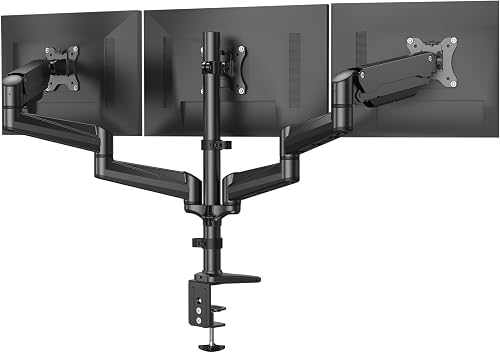
The MOUNTUP MU0006 is the value clamp mount, rated for screens from 10 to 27 inches at up to about 19.8 pounds per arm, with a wide adjustment range of tilt, swivel, and rotation, and a choice of C clamp or grommet mounting. For a racer whose desk has a solid edge, a clamp mount is the steadier anchor, since it grips rather than rests, and this one carries a large pool of owner feedback, which is a fair signal of consistency. Its full articulation makes angling the outer screens toward you straightforward. The caveats are the ones common to all clamp mounts: it needs a desk edge within its clamp range, and it passes desk movement into the screens, so a shaky desk becomes a shaky wall. It suits a firm desk with three panels at or below 27 inches, and it is the wrong choice for a glass desk or one without a clampable edge.
VIVO STAND-V300G Pneumatic: the pick for larger screens
The VIVO STAND-V300G is the clamp mount for larger panels, rated to 32 inches at up to 17.6 pounds each, with dual pneumatic gas spring arms that counterbalance the screens for smooth height and angle changes, a fixed center bracket, and a 3 year warranty. For a racer running three larger screens, the higher size ceiling and the gas spring assist are the reasons to pick it, since moving a heavier panel is far easier when the arm carries the weight for you. The measurable tradeoff sits in the numbers: its 17.6 pound per arm limit is below the 19.8 and 22 pound ratings of the MOUNTUP and WALI, so a very heavy 32 inch panel can approach it, and you should confirm your monitor’s weight and VESA pattern before buying. As a clamp mount it also needs a suitable desk edge, up to 3.25 inches thick. It suits a firm desk with three 30 to 32 inch screens that fall inside the weight limit.
HUANUO HNTS3B: the most proven clamp for large panels
The HUANUO HNTS3B covers the same 17 to 32 inch range at up to 17.6 pounds per arm, with full tilt, swivel, and rotation and a choice of C clamp or grommet mounting, and it carries the deepest pool of owner feedback of any mount here. For a racer who wants a large screen clamp with a long track record, that volume of feedback is the draw, since it points to consistent assembly and holding power across many desks. It sits close to the pneumatic VIVO on paper, and the practical difference is the arms: the HUANUO uses standard articulating arms rather than gas springs, so it costs less to move up in size but asks a little more effort to reposition a heavy panel. The caveat is the shared clamp limitation and the 32 inch ceiling, which rules out the largest screens. It suits a firm desk of three panels up to 32 inches where value and a proven design matter more than gas spring convenience.
WALI GMF003: the tip resistant freestanding pick
The WALI GMF003 is a freestanding stand rated for screens from 13 to 27 inches at up to 22 pounds per arm, notable for a design detail that suits a sim desk: its arms swivel forward only, which the maker describes as reducing the risk of the stand tipping. For a racer who wants a freestanding wall of three 27 inch panels, it is a strong pick, since the forward only swivel keeps the weight distribution predictable. The caveats are its size ceiling and its adjustment range: 27 inches is the limit, so larger panels are out, and the forward only swivel that aids stability also limits how far you can splay the outer screens. It suits a desk of three panels at or below 27 inches where tip resistance ranks above maximum flexibility.
Mount-It MI-2789: the freestanding pick for awkward desks
The Mount-It MI-2789 is a freestanding stand with a compact base, rated for flat screens up to 27 inches or curved screens up to 24 inches at up to 15.4 pounds per monitor, with independent full motion arms and a lifetime warranty. For a racer whose desk cannot take a clamp, whether it is glass, has no clampable edge, or sits against a wall, the drill free base is the reason to choose it, since it needs no desk edge at all. The caveats are the lowest weight limit and the tightest size ceiling here, and the notable one for sim racing is the curved screen limit of 24 inches, since many sim triples use curved panels, which brings that ceiling into play sooner than the flat rating suggests. It suits a smaller triple of flat or modest curved panels on a desk where clamping is not an option, and it is the wrong pick for a wall of large curved screens.
Freestanding, clamp, and rig integrated mounts in plain terms
The choice between mount types comes down to how your wall is anchored and how much movement reaches it. A freestanding stand rests on the desk and needs weight over its base, or a bolt, to resist the forward pull of leaning in, which is why several makers here warn about it directly. A clamp mount grips the desk edge for a firmer hold, but it passes any desk movement straight into the screens, so on a desk that also carries a wheel it can transmit vibration into the picture. That last point is the one sim racers underrate: if your wheel is mounted to the same desk as your screens, a strong force feedback effect can shake the whole wall. The steadiest answer for a dedicated cockpit is neither of these but a rig integrated monitor mount that bolts to the frame itself, isolating the screens from the wheel. If that describes your setup, weigh a cockpit mounted stand over any desk mount here, and confirm every screen’s VESA pattern and weight against the mount before you buy.
Who should buy which
| Pick this if | Look elsewhere if |
|---|---|
| You want a freestanding stand for panels up to 30 inches (VIVO STAND-V003E) | Your desk edge is solid and you prefer a firmer clamp hold |
| You want a proven clamp for panels up to 27 inches (MOUNTUP MU0006) | Your desk is glass or has no clampable edge |
| You run larger screens and want gas spring assist (VIVO STAND-V300G) | Your panels exceed the 17.6 lb per arm limit |
| You want the most proven clamp for panels up to 32 inches (HUANUO HNTS3B) | You want gas spring arms rather than standard ones |
| You want a tip resistant freestanding stand (WALI GMF003) | Your panels are larger than 27 inches |
| Your desk cannot take a clamp at all (Mount-It MI-2789) | You run large curved panels above 24 inches |
None of these desk mounts are the right call for a dedicated cockpit running heavy force feedback, where a rig integrated monitor mount bolted to the frame holds the wall far steadier. They are also the wrong tool for a single ultrawide screen, which needs a single arm rather than a triple mount, and for any panel that exceeds a mount’s rated size, weight, or VESA pattern.
How we score
The WSR Score shown in the product cards above reflects verified buyer ratings gathered and normalized on a consistent scale, not an editorial rubric. You can read what goes into it on How We Review.
More to compare
To choose the screens that go on the mount, see our best ultrawide monitors and best curved monitors guides, or start with value in our best monitors under $300 roundup. To drive a triple wall you will want a capable machine, covered in our best gaming PC under $2000 roundup. The rest of our display coverage lives in the monitors category.